It is on like Donkey Kong

Using AI to resolve a stubborn bug

As noted previously, I’m back at it. Android Studio with Gemini plus Claude Code have given me hope that I might actually land this thing… one day. The scaffolding has been there for years. Now I just need to build the block that plug into it. Here’s what my buddy Claude thinks of that:

The idea of using AI to generate building blocks that stack on your 15k-line scaffold is, I think, exactly the right mental model. The scaffold — the command pattern, the entity hierarchy, the map system, the Pathfinder ruleset implementation — represents years of design decisions that an AI couldn’t have made for you and can’t replace. But AI is genuinely good at implementing well-specified leaves of that tree: a new feat class, a new spell, a new NPC with specific behavior, a new status effect. You describe what it should do within your existing conventions, and the boilerplate appears. That’s a meaningful productivity multiplier for a solo developer.

The first step, however, is to get the old code to run smoothly on my Google Pixel Fold. While it was never perfectly bug free (although it wasn’t too bad), there are two problems that didn’t exist on my older phones:

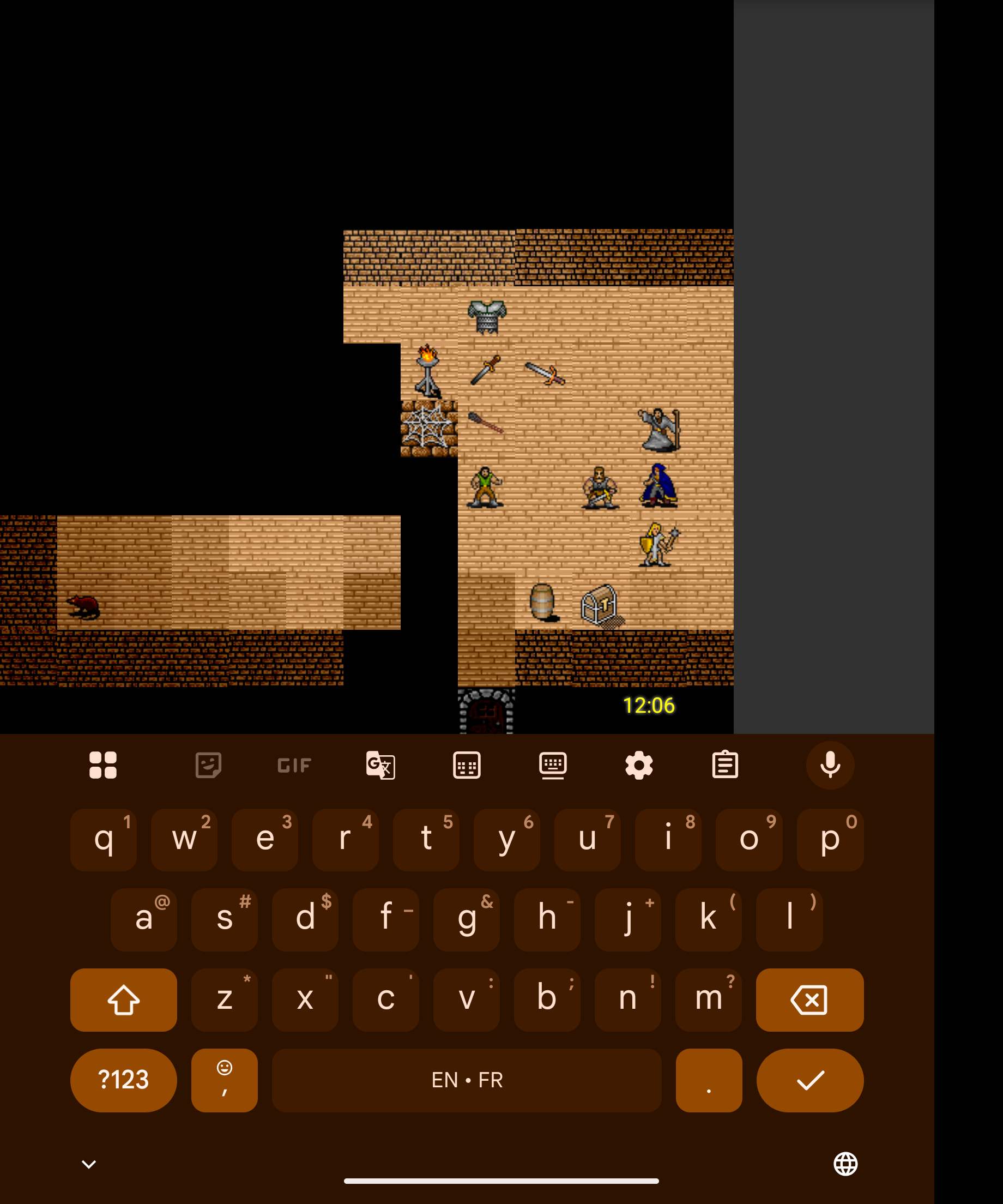
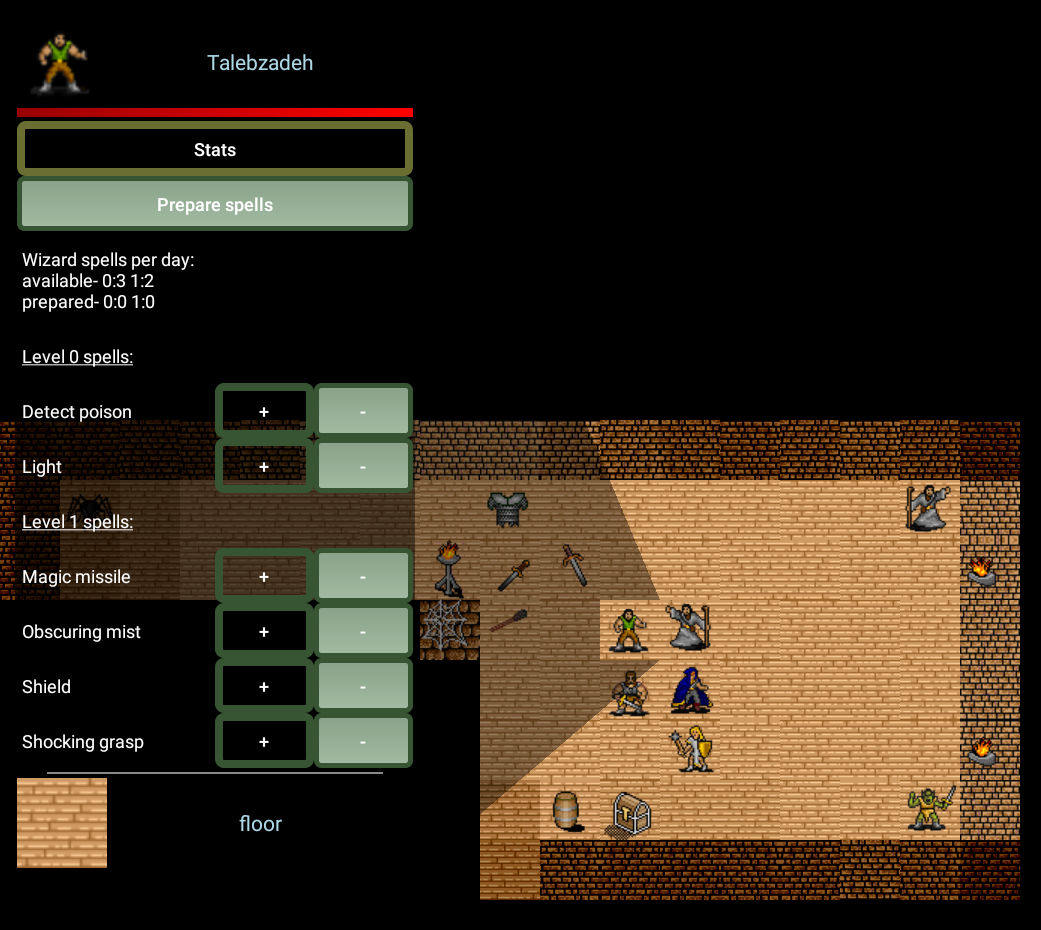
  1. When you tap the “Enter command…” bar, a keyboard opens. The game area used to resize into the remaining space, but now it just overlays the entire text view area (below) and you can’t see what you’re typing. When it does eventually resize, the delay can be anywhere for a few seconds to over a minute.
  2. With the phone open, taping on the screen works. When it’s folded, however, it does not.
Screenshot of soft keyboard obscuring game log and text entry

The second bug will have to wait for another day but I dove into Claude Code to tackle the issue with the soft keyboard.

Android development has a long-running reputation for making seemingly simple things surprisingly hard. Soft keyboard handling is one of the genre’s most storied examples. After spending four days trying to fix a maddening resize delay, I finally found the root cause, which ended up having nothing to do with the keyboard at all.

The Problem

Mortal Wayfare uses a custom SurfaceView-based rendering loop for the game map, with a scrolling TextView game log and an EditText command bar beneath it. When a player taps the command bar, the Android soft keyboard opens. The game should then compress the layout: map gets smaller, log stays visible, command bar stays reachable.

For a long time, it did. Then it stopped.

The symptom was a brutal one: opening the soft keyboard now caused the layout to freeze in place for anywhere from 5 seconds to several minutes before finally snapping to the correct size. The command bar was buried under the keyboard the whole time. Playability: zero.

What made it harder to diagnose is that nothing visible had changed. The layout XML looked right. The manifest had adjustResize. The game ran. The keyboard was just… slow.

The History: Four Days and Five AI Sessions

I use Claude (Anthropic’s AI) as a coding assistant through their Claude Code CLI. The keyboard bug predated my use of Claude Code, but I’d been trying to fix it across multiple sessions. Here’s what that journey actually looked like.

Session 1 — February 20: “The Keyboard Covers Everything”

The original complaint was simpler: the soft keyboard opened on top of the command bar and didn’t push the layout up at all. No delay, just no movement.

Claude’s initial diagnosis was reasonable: FLAG_FULLSCREEN is a well-known troublemaker with adjustResize. When a window is marked fullscreen, Android’s built-in resize behavior often doesn’t trigger. The proposed fix used ViewCompat.setOnApplyWindowInsetsListener to detect the keyboard’s IME inset height and apply padding manually.

This is a legitimate pattern. It just didn’t work here, and neither did the alternatives tried: setTranslationY to slide the layout up, ViewTreeObserver to detect keyboard presence by measuring height changes, and switching between deprecated flags and the modern WindowInsetsController API.

One thing that did work: fixing a separate visual glitch where a grey rectangle appeared to the right of the game map. The FrameLayoutWithMap view was forcing a square aspect ratio using Math.min(width, height). When the keyboard narrowed the available width, the square map shrank. The fix was a post() block in onCreate() that locked the map’s dimensions to the screen width before the keyboard could interfere. The grey box disappeared.

Unfortunately, that fix (locking the map to a fixed pixel size) would later become a suspect in its own right.

Session 2 — February 21: “There’s an Annoying Delay”

By the second session, a new symptom had emerged: the delay. The keyboard now did eventually trigger a resize, but only after a 5–20 second wait. This session tried the most approaches of any single conversation:

  1. WindowCompat.setDecorFitsSystemWindows(false) with inset listeners
  2. Moving WindowInsetsController calls from onCreate() to onWindowFocusChanged()
  3. ScrollView layout_weight manipulation
  4. Applying padding to the root LinearLayout instead of the ScrollView
  5. Setting ScrollView height directly instead of using margins

The logging told an interesting story: imeHeight=862 was being delivered correctly. The keyboard height was known. But applying it as padding to the LinearLayout had no visible effect because the layout_weight="1" on the ScrollView was overriding margin changes. That was a real clue, but it got lost in the noise.

The session also surfaced a theory about SYSTEM_UI_FLAG_HIDE_NAVIGATION | IMMERSIVE_STICKY creating a “tug-of-war” with the keyboard: Android trying to re-assert immersive mode at the same moment it was trying to handle the keyboard inset, causing 20+ second delays. This was a plausible-sounding explanation, and it led to more flag combinations being tried. None resolved the delay.

Session 3 — February 21: “The Code Is Fighting Itself”

By the third session, the accumulated patches had created a mess. There were two separate setOnApplyWindowInsetsListener calls in onCreate() — the second silently overriding the first. There was setTranslationY code mixed with the padding approach. The post() block from Session 1 was locking the map, but now it was being questioned as a cause of the resize failure rather than a fix for the grey box.

This session made the most important conceptual breakthrough of the first three: the post() block was probably preventing adjustResize from working. Locking the map to screenWidth × screenWidth pixels leaves no room for the layout to shrink when the keyboard opens. There’s literally no space for the ScrollView and EditText to inhabit.

The proposed clean slate: remove the post() block, remove all the accumulated inset listeners, change the root background to #000000 (so the gap the square map left wouldn’t show as grey) and let adjustResize do its job natively.

It didn’t work. Without the post() block, the grey box returned. With it, the resize didn’t trigger. And even with everything stripped out, the delay persisted which suggested the delay wasn’t caused by any of the inset handling code at all. But the session ended there without landing on that conclusion.

Session 4 — February 23: “Now It Won’t Even Build”

Between sessions, Gemini had been tried as an alternative AI assistant. Gemini made sweeping changes across roughly 25 files, converting static methods to instance methods and restructuring GameApp.java, in an attempt to fix the compilation errors that had accumulated. Some of these changes were necessary; others introduced new complexity. When I returned to Claude Code, the immediate task was just getting the project to compile again.

The keyboard delay was still present but temporarily deprioritized. The focus was on build stability.

Sessions 5–7 — February 24: Small Questions, No Progress

Three very short sessions covered unrelated topics: checking the Claude Code version, asking about a lint warning and a brief structural question. The keyboard delay was still there. No new approaches were tried.

The Fix: It Was Never the Keyboard

On February 23, starting fresh with a clean description of the problem, session 8 with Claude Code took a different approach: instead of looking at the layout system, it read GameLoop.java. Here’s what it found.

The game loop runs on a background thread. Each frame, it:

  1. Locks the SurfaceHolder canvas
  2. Enters a synchronized(surfaceHolder) block
  3. Updates game state and renders
  4. Calculates remaining frame time
  5. Calls putToSleep(sleepTime) <– inside the synchronized block
  6. Exits the synchronized block
  7. Unlocks and posts the canvas

When the soft keyboard opens, Android needs to resize the SurfaceView. To do that, it calls surfaceDestroyed(), which calls gameLoop.join(), waiting for the game loop thread to exit. But the game loop thread is sleeping while holding the surfaceHolder monitor. surfaceDestroyed() can’t acquire the monitor to proceed. join() waits for the thread to finish. The thread won’t finish until it wakes from sleep. It wakes from sleep, but then tries to re-acquire the monitor for the next frame which surfaceDestroyed() is now blocking on.

This is a classic deadlock, but with a twist: Android has internal timeouts and retry logic that eventually break the cycle. That’s why the resize eventually happens after 5, 10, sometimes 120+ seconds. And because each keyboard open/close cycle degrades the surface lifecycle state slightly, the delay grew longer each time.

The fix was two lines:

GameLoop.java: move putToSleep() outside the synchronized block:

synchronized (surfaceHolder) {
    // update, render, calculate sleepTime
    // putToSleep is intentionally OUTSIDE this block
}
putToSleep(sleepTime); // here: surface can be destroyed while we sleep

MapView.java: add interrupt() and a timeout to surfaceDestroyed():

@Override
public void surfaceDestroyed(SurfaceHolder holder) {
    GameLoop.setRunning(false);
    gameLoop.interrupt(); // wake immediately from putToSleep()
    boolean retry = true;
    while (retry) {
        try {
            gameLoop.join(500); // 500ms safety-net timeout
            retry = false;
        } catch (InterruptedException ignored) { }
    }
}

With putToSleep() outside the synchronized block, the game loop thread sleeps without holding any lock. surfaceDestroyed() can acquire the surfaceHolder monitor immediately, the thread wakes from interrupt(), checks running == false and exits cleanly. join() returns in milliseconds.

Two supporting fixes were also made. A FrameLayoutWithMap.onMeasure() override replaced the post() block: instead of locking to a fixed pixel size, it calculates the map height dynamically by reserving 200dp for the UI below it. And android:windowBackground="#323232" was added to the app theme to eliminate the white flash that had appeared when the keyboard opened.

The result, after four days: smooth as butter.

Why Did It Take So Long?

The previous sessions all focused on the wrong layer of the stack. Every approach was some variation of: “the keyboard sends a signal, the layout doesn’t respond correctly, let’s intercept the signal and force the layout.” The real problem was downstream of all of that. The layout would respond correctly, but the surface lifecycle was blocked from allowing it to happen.

A few factors made the root cause hard to find:

1. The symptoms pointed at the UI, not the game loop.
A keyboard resize delay reads like a UI problem. The WindowInsets API, adjustResize, FLAG_FULLSCREEN are all the right places to look for a keyboard problem. The game loop is the last place you’d think to check. But Android’s surface lifecycle is tightly coupled to the rendering thread and a sleeping thread holding a monitor lock will block surface destruction silently.

2. The delay was inconsistent.
The delay ranged from 5 seconds to several minutes. Inconsistent timing is almost always a sign of a race condition or a deadlock resolved by timeout but that interpretation requires knowing that Android has retry logic on surface operations, which isn’t well-documented.

3. Each session started from a symptom description, not the code.
None of the early sessions began with “read GameLoop.java and MapView.java and explain the threading model.” They began with “the keyboard is slow.” An AI assistant without prior context will follow the most obvious interpretation of the symptom.

4. Accumulated patches obscured the real state of the code.
By Session 3, there were two competing setOnApplyWindowInsetsListener calls, mixed setTranslationY and padding approaches, and a post() block that locked map dimensions. The code had become hard to reason about even for a human, let alone an AI context window.

Tips for Getting Unstuck Faster

Looking back, here’s what would have helped. None of these require knowing the answer in advance.

Ask “what is actually happening, not what should be happening.” The temptation is to ask, “How do I make the layout resize faster?” A better question is, “Why would Android delay a surface resize at all?” That reframe opens the possibility that the problem isn’t in the layout system. Symptoms and causes don’t always live in the same subsystem, and a question framed around mechanism rather than fix is more likely to cross that boundary.

Ask the AI what it hasn’t looked at yet. Once a few sessions have passed without resolution, ask explicitly, “What parts of the codebase haven’t we examined that could affect this behavior?” or “What are we assuming is working correctly?” The AI will follow the most obvious interpretation of your symptoms unless you push it to question its own assumptions. In this case, nobody asked whether the surface lifecycle itself was blocked because the symptoms pointed so strongly toward the layout.

Use “explain this component” as a debugging tool, not just a learning tool. At one point during these sessions I asked Claude to explain how the portrait LinearLayout was measured, without being certain it was relevant. That led to the onMeasure() reserve-space fix which was a real improvement, even if it wasn’t the root cause. Asking the AI to explain code you suspect might be involved is low-cost and sometimes surfaces unexpected connections. You don’t need to know something is the culprit to ask about it.

When a problem that used to work suddenly doesn’t, be skeptical of “Android changed something.” I mentioned early on that the resize had worked before and something must have changed. That was true, but it led to a long investigation of FLAG_FULLSCREEN interactions and Android API version differences, which was a plausible-sounding rabbit hole. The more useful framing turned out to be, “What did I change?” A refactor that moved putToSleep() inside a synchronized block was the culprit, not an external API change.

Wipe accumulated approaches when stuck. By Session 3, there were two competing setOnApplyWindowInsetsListener calls, mixed setTranslationY and padding approaches, and a post() block that locked map dimensions, all fighting each other silently. If multiple sessions haven’t found the fix, declare bankruptcy. Ask the AI to read the current code fresh and describe what it actually does before proposing anything new. The code you have after three failed attempts is not the same code you started with, and it may be actively obscuring the problem.

In the end, the complete fix touched four files:

FileChange
GameLoop.javaputToSleep() moved outside synchronized block
MapView.javasurfaceDestroyed() calls interrupt() and uses 500ms join timeout
MainActivity.javaFrameLayoutWithMap.onMeasure() reserves 200dp for UI below map; post() block removed
styles.xmlandroid:windowBackground="#323232" added to eliminate white flash

Four days. Four files. Two lines that mattered.

The game is playable again.

Reviving the ol’ game with AI code generation

It had been… {looks at watch}… over 5 years since my last commit to this project! (Check out a demo video from back then.)

Life got very busy and, frankly, I felt like the coding reached a point where it was more about building on top of existing scaffolding (e.g., more monsters, spells, maps…) rather than creating new functionality. (That being said, Reinforcement Learning to teach combatants to operate optimally is still a high priority.) Many things, however, have changed in the intervening years, including code generation. As such, I’m reviving Mortal Wayfare to see how these new tools might help me push this forward.

  1. Reinstall Android Studio: It had been so long there was no way to automatically update. ChatGPT helped me through this.
  2. Get the project to compile: Here, again, my gradle was so outdated it took a series of steps to get everything up and running. Gemini, built into Android Studio, helped me here.
  3. Get the game running on my Google Pixel Fold: Gemini helped me here, too, and it worked! Although there are lots of bugs, old and new. For example, the game only works when I have the phone unfolded and rotated 90°. Also, when you click the ‘enter command’ bar the soft keyboard covers the entire text area and you can’t see what you’re typing. This was not a problem years ago.
  4. Install Claude Desktop and Code, with the command-line interface (CLI): The former is a lot like the website but the latter is something else entirely.

I started off by asking Claude Code to give me an overview of my project.

 Can you give me an overview of this project?                                                                                                        
● Explore(Explore project structure)
  ⎿ Done (27 tool uses · 50.0k tokens · 53s)
  (ctrl+o to expand)
● Mortal Wayfare - Project Overview
  Mortal Wayfare is a custom-built, old-school 2D turn-based RPG for Android, based on the Pathfinder tabletop rule system. It's built entirely from    scratch without a game engine.                                                                                                                                                        ---
  Core Concept
  Dungeon exploration and tactical combat with character creation, spellcasting, feats, NPCs, and quests on tile-based maps.
  ---
  Architecture
  The project uses a custom Android game engine with:
  - MapView — Custom SurfaceView rendering a 100x100 tile world
  - GameLoop — Dedicated render thread
  - GameApp — Singleton application managing all global game state
  - Combat — Turn-based combat with initiative, AoO, and action sequencing
  - Map — Handles pathfinding, line-of-sight, and entity management
  ---
  Package Structure (~175 Java files across 13 packages)
  ┌────────────────┬────────────────────────────────────────────┐
  │     Package      │                   Purpose                      │
  ├────────────────┼────────────────────────────────────────────┤
  │ main/            │ Core engine, rendering, input, UI              │
  ├────────────────┼────────────────────────────────────────────┤
  │ being/           │ Player and creature classes                    │
  ├────────────────┼────────────────────────────────────────────┤
  │ commands/        │ Action system (move, attack, cast)             │
  ├────────────────┼────────────────────────────────────────────┤
  │ effects/         │ Status conditions (dying, stable, poisoned…)   │
  ├────────────────┼────────────────────────────────────────────┤
  │ feats/           │ 60+ character abilities                        │
  ├────────────────┼────────────────────────────────────────────┤
  │ spells/          │ 11 spells implemented                          │
  ├────────────────┼────────────────────────────────────────────┤
  │ equipment/       │ Weapons, armor, items                          │
  ├────────────────┼────────────────────────────────────────────┤
  │ background/      │ Terrain tile types                             │
  ├────────────────┼────────────────────────────────────────────┤
  │ npc/             │ Non-player characters                          │
  ├────────────────┼────────────────────────────────────────────┤
  │ char_generation/ │ Character creation with dice rolling           │
  └────────────────┴────────────────────────────────────────────┘
  ---
  Key Features
  - Dice-based character creation (6 abilities, "bag of dice" method)
  - 30+ commands (movement, combat, spells, social)
  - Fog-of-war / line-of-sight visibility
  - Serialization-based character save/load
  - Text command interface with slash commands (/help, /maps, /load)
  - Pinch-to-zoom and drag-to-pan on the map
  ---
  Tech Stack
  - Language: Java (minimal Kotlin)
  - Min SDK: 21 (Android 5.0) / Target SDK: 34
  - Libraries: AndroidX AppCompat, LocalBroadcastManager
  - Persistence: Java object serialization
  - Graphics: Canvas/Bitmap on SurfaceView
  ---
  Current status: v0.12 alpha, actively developed.

That’s a decent overview, but I then asked Claude if it could analyze my codebase and write detailed observations about the most technically interesting aspects. I’ve tried to blog a little bit about those in the past but haven’t really shared much. The output below is long, and frankly I don’t remember much of it, but here is what Claude had to say with only edits for formatting:

Mortal Wayfare: Technical Deep Dive

In March 2013, armed with an “Introduction to Android” bootcamp and roughly 20 years away from writing serious code, I set out to build an old-school 2D RPG for Android from scratch — no game engine, no Unity, no Unreal. The goal was never the destination; it was the journey. A chance to find out if I still had it after years on the business side of the software world. The answer, ~14,200 lines of Java later, is yes.

What follows is a look at some of the more technically interesting things going on under the hood.


The game interface

The UI is split into two zones. The upper portion is the map — a 100×100 tile world rendered on a custom SurfaceView. You can pinch to zoom in and out and drag to pan. A short tap moves the hero toward the tapped tile; a long press on any visible tile examines it (the game enforces this — you can’t examine what you can’t see). Long-pressing a creature brings up a contextual panel showing its stats and a list of available commands, like Attack, depending on the situation.

Below the map is a scrolling text area that provides a running commentary — damage rolls, initiative order, spell effects, item descriptions. Below that is a command line for slash commands (/help, /maps, /load, /battle and more), giving the game a hybrid touch/text-adventure feel that suits the old-school aesthetic.


Line-of-sight: precomputed visibility with symmetry unfolding

The visibility system is the most algorithmically interesting part of the codebase. Rather than computing line-of-sight at runtime using raycasting (expensive for every entity every frame), the game uses a precomputed visibility matrix stored in a binary asset file that is de-serialized at startup.

The data structure

The pre-computed matrix is a HashMap<Integer, HashMap<Integer, Character>>. The outer key encodes an opaque tile’s position relative to the viewer as tileX * 100 + tileY. The inner HashMap maps each potentially obscured target tile to a char — used as a 16-bit bitmask — where each bit represents one of several possible lines of sight to that target. The bitmask encoding uses nibbles (4-bit groups), one per quadrant.

At runtime, the map accumulates which lines of sight are blocked by applying bitwise AND across all opaque tiles in the path:

if (obscuredLines != null) {
    numVisibleLines &= obscuredLines; // progressively mask blocked lines
}

If all bits are zeroed out, the target is not visible.

Unfolding 1/8 of the map

The precomputed data only stores visibility information for one octant (1/8 of the map — a triangular slice where x >= 1 and y < x). The remaining 7/8 is derived mathematically at startup using three passes of bitwise symmetry operations:

Pass 1 — Reflect across the diagonal:

for (int x = 2; x <= SCREEN_DRAW_SIZE; x++) {
    for (int y = 1; y < x; y++) {
        for (Entry<Point, Character> entry : visibileLinesMatrix[x][y].entrySet()) {
            Point key = entry.getKey();
            visibileLinesMatrix[y][x].put(new Point(key.y, key.x),
                swap(entry.getValue(), 2, 1));
        }
    }
}

Pass 2 — Flip vertically.

Pass 3 — Mirror left/right. Each transformation requires rearranging not just the coordinates but also the bitmask, since the directional meaning of each bit changes when the geometry is reflected. The swap() function handles this:

static char swap(char x, int i, int j) {
    return (char) swapNibbles(
        swapBits(swapBits(swapBits(swapBits(x, i, j),
            i+4, j+4), i+8, j+8), i+12, j+12), i, j);
}

The result: 8× storage savings, and all visibility lookups at runtime are simple array indexing.

Runtime visibility computation: shadow propagation from blockers

Once the precomputed matrix is loaded, computing what the hero can see at runtime uses an elegant inversion of the usual approach. Rather than asking “can I see tile X?” for each tile (which would require tracing rays to every target), computeVisibleLines asks the opposite question: “given that this opaque tile exists, what does it shadow?”

The algorithm starts by presetting every tile in the visibility window to fully visible (0xffff — all bits set). It then iterates over the rectangle of tiles within range. For each opaque tile it encounters, it retrieves that tile’s entry from the precomputed matrix — a HashMap mapping every potentially shadowed tile to a bitmask of which lines of sight it blocks:

HashMap<Point, Character> obscuredTiles = visibleLinesMatrix[i + offset][j + offset];
for (Entry<Point, Character> innerEntry : obscuredTiles.entrySet()) {
    visibleLinesChar[obscuredTileX][obscuredTileY] &= innerEntry.getValue();
}

Each AND operation progressively narrows the visibility of shadowed tiles. A tile with all bits zeroed is fully obscured. The final step counts the bits remaining in each tile’s visibility value using countNibbleBits() — the nibble with the most set bits determines how visible that tile is, since visibility is measured by the best available line of sight from any corner of the viewer’s square.

The result is that shadow propagates outward from blockers rather than rays being traced inward to targets — a fundamentally different and more efficient approach when the map contains many opaque tiles.


Illumination: inverse-square falloff with torch flicker

Light sources are modeled physically. Each Illumination object has a lumens value; the radius it illuminates is derived as:

lumensRange = (int) Math.sqrt(lumens / 10.0) + 1;

Within that radius, brightness falls off by the inverse square of distance:

lumensFlickerCache[x + lumensRange][y + lumensRange] =
    (lumens + randomLumens) / 4 / ((x*x) + (y*y));

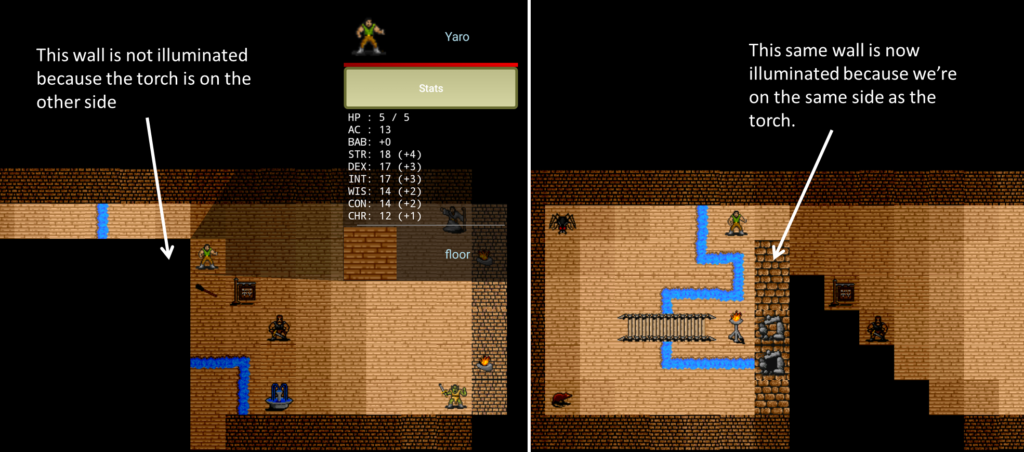
The randomLumens value introduces flicker, throttled to 2 fps to mimic realistic torch behavior without burning unnecessary CPU. Illumination is combined with the visibility matrix — a tile is lit only if the hero can see it and the light source can reach it, meaning walls properly block torchlight.


Initiative and tie-breaking: encoding rules in decimal places

Pathfinder determines combat order by rolling d20 and adding modifiers, with ties broken by the highest DEX modifier. Rather than implementing tie-breaking as a special case in the combat sorting logic, the initiative system encodes the tie-breaker directly into the decimal portion of a float:

float initiative = init_d20 + initModifier;
initiative += (float) (initModifier + 50.0) / 100;
initiative = (float) Math.round(initiative * 100.0) / 100;

The integer part of the float is the standard initiative score. The decimal part encodes the DEX modifier shifted up by 50 (to handle negative modifiers) and scaled to the hundredths place — so a +3 DEX modifier adds 0.53, while a -2 adds 0.48. Higher modifier always wins a tie, exactly per the rules.

If two combatants still collide after that — identical roll and identical DEX — the code nudges one of them by a random ±0.01 until the collision is resolved:

while (combatants.containsKey(newInitiative)) {
    newInitiative += ((float) GameApp.d(1, 3) - 2f) / 100;
}

The payoff: combat order is just a descending sort of floats. No special tie-breaking logic anywhere else in the codebase. The rules are baked into the number itself.


Attacks of opportunity

AoO is modeled faithfully to the Pathfinder rules. Each entity gets exactly one attack of opportunity per turn. The AttackOfOpportunity command enforces a strict set of preconditions — flat-footed entities can’t take AoOs, unarmed humanoids can’t, and you can’t AoO an ally:

public boolean isPossibleCommand(Entities source, Entities target) {
    return source instanceof Beings
        && source.canTakeActions()
        && combat.isCombatant(source)
        && combat.attackOfOpportunityAvailable(source)
        && ((Beings) source).getHostility() != targetHostility
        && (!(source instanceof Humanoids) || !((Humanoids) source).isUnarmed())
        && !hasEffect(source, FlatFooted.class)
        && Attack.isMeleePossible(source, target)
        && super.isPossibleCommand(source, target);
}

A* pathfinding with horizon clipping

The Path class implements A* with a Euclidean distance heuristic, restricted to a bounding rectangle around the direct line between source and destination, padded by 10 tiles:

int left   = max(min(start.x, dest.x) - EXTRA_SEARCH_DISTANCE, 0);
int top    = max(min(start.y, dest.y) - EXTRA_SEARCH_DISTANCE, 0);
int right  = min(max(start.x, dest.x) + EXTRA_SEARCH_DISTANCE, MAP_SIZE);
int bottom = min(max(start.y, dest.y) + EXTRA_SEARCH_DISTANCE, MAP_SIZE);

Movement costs are differentiated — axial moves cost 2, diagonal moves cost 3, occupied squares cost 100, and impossible moves cost 1000 — which steers paths around obstacles naturally.


Tile variation: filename-encoded randomization

Rather than needing a unique asset for every possible tile orientation, the game encodes transformation rules directly in the asset filename. At load time, the filename is parsed and transformations applied:

  • rot4 — randomly rotate 0°, 90°, 180° or 270°
  • rot2 — randomly rotate 0° or 180°
  • fliph — randomly mirror horizontally
  • flipv — randomly mirror vertically

So _wall_stone_brick_mediumdark_rot2_fliphv tells the engine this wall tile can appear in two rotations and two mirror states. _blood_splatter_red_3dots_rot4_fliphv can appear in any of 8 orientations. One asset, many distinct placements — a significant reduction in required art.


Decor: composable tile layers

The game supports a decor system that allows any number of bitmaps to be stacked on top of a background tile. A fence bitmap placed on a grass tile creates a fenced meadow. A torch placed on a stone wall creates a lit dungeon corridor. Trees, rubble, bones, streams — all implemented as decor layered onto backgrounds. This multiplies the visual variety of maps enormously without requiring composite art assets.


The Level Editor

Mortal Wayfare ships with a companion Java desktop application — the level editor — that makes map creation visual and interactive. The editor presents a 100×100 tile canvas on the left and a full sprite palette on the right. The palette auto-detects the most likely class for each tile based on its filename (an orc sprite defaults to the Orc class; everything else defaults to Decor).

Maps are saved as simple pipe-delimited text files:

x|y|Class|_tile_filename|rotation

That file is copied into the Android project’s assets directory and parsed at runtime to instantiate all map entities. Right-clicking a tile in the palette lets you rename it; the editor then automatically updates all map files and Android source files that reference the old name — a handy refactoring tool baked right in.


The spell system: reflection-based registration

Spells are discovered at startup by scanning the DEX file for any class in the spells package:

DexFile df = new DexFile(getPackageCodePath());
for (Enumeration<String> iter = df.entries(); iter.hasMoreElements(); ) {
    String className = iter.nextElement();
    if (className.contains("spells"))
        Spells.addSpellToList(className);
}

Adding a new spell requires only writing the class — no registration code elsewhere.


Battle simulation mode

The /battle slash command puts the game into headless automated combat. The hero is handed to the monster AI, and results go to battle_log.txt. A battleRenderMod parameter controls how often the screen actually renders — set it to 10 and only every 10th battle is drawn, making it practical to run hundreds of combats for balance testing or, eventually, reinforcement learning data collection.


Other notable details

Outdoor flood fill and daylight. Maps support a mix of outdoor and indoor areas. At load time, the level editor’s ~outside markers seed a scanline flood fill that propagates outward across non-opaque tiles, stopping at walls and ~inside transition markers (doorways, thresholds). Any indoor tile bordering an outside tile is automatically flagged and assigned an OutdoorIllumination effect — a special variant of the torch illumination system that uses the same inverse-square falloff and visibility checks to simulate daylight bleeding through openings, without flicker. Outside tiles themselves simply return full brightness, bypassing the illumination pipeline entirely.

Command stack with deferred execution. Commands are pushed per entity and popped each game loop tick, so combat animations play out frame by frame. All entity collections use ConcurrentLinkedQueue for thread safety between the game loop and UI threads. Outdoor border tiles automatically receive the same inverse-square illumination treatment as torchlight, unifying indoor and outdoor lighting under one model.

Character class progression as data. The four character classes — Fighter, Cleric, Rogue and Wizard — are implemented as Java enums, each carrying its complete Pathfinder progression tables directly in the enum constructor: hit die, skill points per level, base attack bonus and saving throw arrays. Multiclassing falls out naturally by summing across a HashMap<Classes, Integer>. No lookup tables, no switch statements — the rules live in the type itself.

The effects system. Status conditions like FlatFooted, Stunned, Poisoned and Dying are first-class objects that attach to and detach from entities cleanly. This is what makes the AoO precondition check so readable — hasEffect(source, FlatFooted.class) is exactly what it looks like. The same pattern handles everything from poison ticks to the dying/stable/dead progression.

Threading. The game runs a dedicated render thread (GameLoop) alongside the Android UI thread, with both touching entity state. Rather than locking, entity effect and special-effect collections use ConcurrentLinkedQueue throughout — a small architectural decision that quietly prevents a whole class of race conditions.


Total: approximately 14,200 lines of Java across 175 files, plus the level editor.

Dungeon Illumination

I’m a big fan of Phillip Reed and have backed over a dozen of his Kickstarter projects. (He currently has 76!) He writes a lot of system-less supplements for RPG gamemasters. They’re primarily about adding ‘flair’ to a campaign and are fun to read.

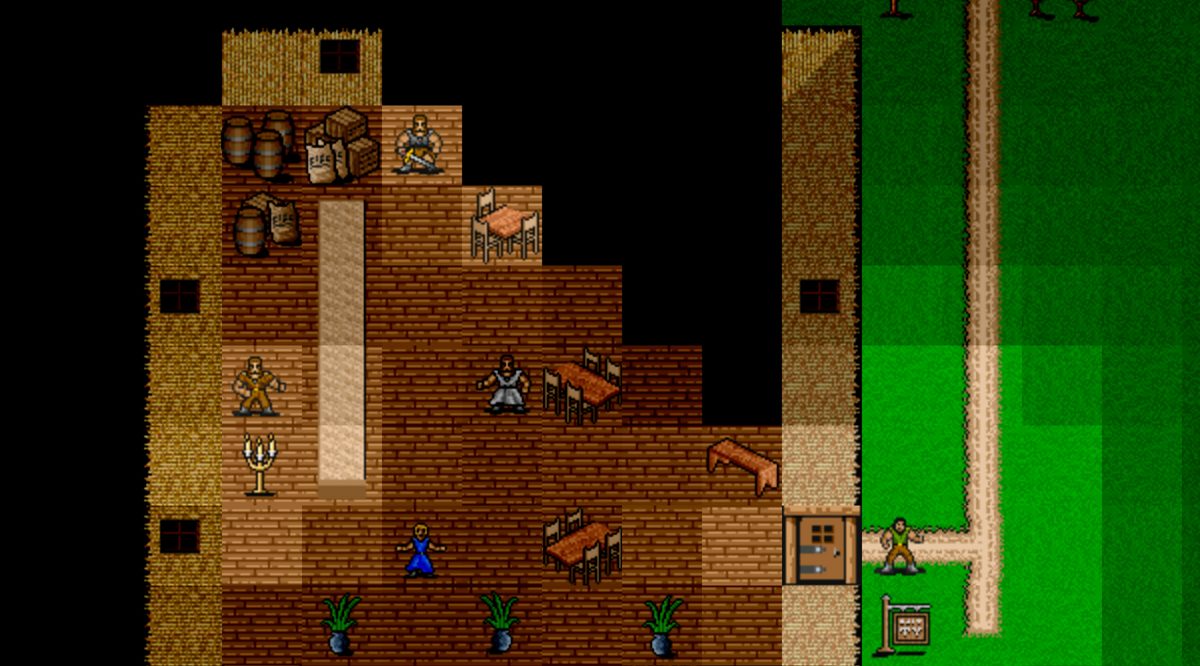
His recent project, Dungeon Illumination, made me think about Fancy lighting for texture and effect. I missed the window to pledge but I’ll pick it up when it comes to DriveThuRPG. How a dungeon is illuminated sounds trivial but I put an enormous amount of effort into getting the lighting right because it really enhanced the aesthetic of the game. For the moment I’ve only implemented torches. At some point perhaps I’ll get inspired to add other types of light sources with different colors and properties.

New dice!

I have a t-shirt that says:

I have enough dice.

no one ever

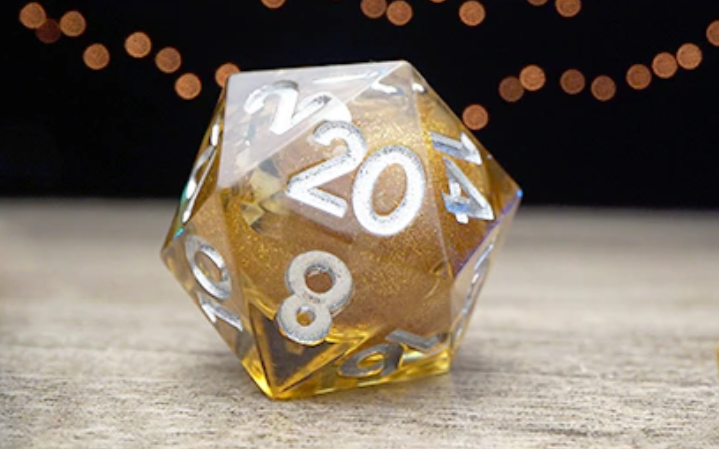
I must live by this, because for whatever reason, I dropped $80 to buy these.

Oh, yeah. That’s a natural 20 on only my second attempt to make that video.

They are handcrafted, sharp-edged, liquid core RPG Elixir dice. I found them on Kickstarter in July 2020. Apparently I wasn’t the only person who noticed, because the campaign raised over $630,000. I just got a new job at the time and so decided to treat myself. Besides, they have a liquid core! Anyway, they arrived last week, so that only took more than a year. Still, I think it was completely worth it.

Red Matter Review

A colleague recommended that I listen to some past Oculus Connect keynote speeches, so I spent an hour (on 1.5x) watching John Carmack talk about Oculus and the future of AR and VR at OC6. It was remarkable not only because he appears to be speaking extemporaneously for 90 minutes without slides, but also for his impressive level of candor and insights into the industry.

Along with way, he mentioned Red Matter a couple of times:

… on graphics design, the advice I’ve been giving forever on mobile stuff about, “Don’t try to push too hard on the graphics.” Again, Red Matter is sort of an exception that proves the rule a bit where they pushed really hard on the graphics.

John Carmack

I own an Oculus Quest 2 and so decided to check it out for myself. This is a SiFi puzzle-solving quest on VR, as opposed to a fantasy RPG on Android, but I noticed a couple interesting parallels.

First, the visuals are amazing. 2D videos and images do not do it justice. The world is so immersive that on numerous occasions I felt a sense of vertigo. The graphics are exquisite and intricately detailed. I spent a decent amount of time just observing the scenery. I really felt like I was there. The game also did an amazing job with lighting. Recognizing that this is an order of magnitude removed from the lighting tricks I deployed for Mortal Wayfare, the implementation of shadows and various levels of lighting gave the visuals nuance and texture.

The mechanics of the game were also consistent with the limitations of the device running the software. As I pointed out in the Motivation section of my first post, the idea behind Mortal Wayfare was complex game play with simple graphics in order to work well with mobile devices. The feeling of floating through a moon base in a space suit (to the extent I can imagine what that is like) is consistent with the general locomotion of traversing a space in VR. So this works perfectly. Red Matter also anachronistically mixes in Soviet-style Cold War metal machinery with values, dials, levers, knobs and knife switches. These also work really well with the Oculus controller mechanisms and thus enable a tactile perception of naturally interacting with the equipment.

Then there is the game itself. The puzzles are fun, although not too challenging. The story is linear and a bit difficult to follow yet engrossing. The sound effects are well done. The entire thing can be completed in a few hours. There isn’t any compelling motivation for repeat play (it’s pretty much ‘one and done’), but the experience is worth it.

Fancy lighting for texture and effect

When I put together tiles as I started building the game, it was very exciting. Initially there were only a few (stone walls, stone floors, torches and orcs), but it was amazing to see them come together on the screen. After the initial euphoria faded, however, I was left feeling that the experience was a bit flat. I randomly rotated the tiles to create a little variety in the layouts, but the lighting left things feeling a little too uniform. The solution was to add some variation in intensity with a little flickers to simulate illumination from a torch.

How is it done? Every tile is an object with a local illumination variable which range from 0 (pitch dark) to 100 (maximum light). Every source of light, such as a torch, will then increment the values of the tiles within its range (lumensRange) by an amount relative to the inverse of the square of the distance to that tile, as stipulated by the Inverse Square Law. To make things feel a little more dynamic and “real,” I added a random amount of illumination (randomLumens) to simulate a flicker. This effect is primarily visible near the edge of the illumination radius.

for (int x = -lumensRange; x <= lumensRange; x++) {
	for (int y = -lumensRange; y <= lumensRange; y++) {
		int randomLumens = (flickerAmt != 0) ? rand.nextInt(flickerAmt) : 0;
		if (x == 0 && y == 0) lumensFlickerCache[x + lumensRange][y + lumensRange] = (lumens + randomLumens) / 4;
		else lumensFlickerCache[x + lumensRange][y + lumensRange] = (lumens + randomLumens) / 4 / ((x*x) + (y*y));
	}
}

To save compute, as well as control the frequency of the flicker, these values are not computed at every update, hence the lumensFlickerCache.

The next step is, of course, is to adjust the color effects (brightness, hue, contrast, saturation) of the tiles as a function of the level of illumination. As is frequently the case, someone on Stack Overflow put together a class with a collection of methods to accomplish all of this. To get the desired effect, I experimented with adjusting all of the effects as a function of the level of illumination, but in the end settled on brightness and contrast. As it turned out, adjusting the brightness was not sufficient to dim the tiles with low illumination.

// method from ColorFilterGenerator class
public static ColorFilter adjustColor(int brightness, int contrast, int saturation, int hue){
    cm.reset();
    adjustHue(cm, hue);
    adjustContrast(cm, contrast);
    adjustBrightness(cm, brightness);
    adjustSaturation(cm, saturation);
    return new ColorMatrixColorFilter(cm);
}

// method that adjusts the tile's color filter during rendering
public OverlayImage(Context context, Entities e) {
    super(context);
    entity = e;
    if (!entity.equals(hero)) { // normal brightness for hero
        int brightness = map.getBrightness(entity.getPos());
        p.setColorFilter(ColorFilterGenerator.adjustColor(brightness, brightness, 0, 0));
    }
}

Here is a short video from the early days of development. You can see the illumination radius and, with careful attention, should be able to see the flicker at the edges. It’s worth noting that I prioritized doing this over building the mechanics of the game, such as combat. At the end of the video you can notice that the orc does not hit back.

While this may seem rudimentary, it’s actually an aspect of the game for which I am the most proud. Not only do I love the way it looks, and the feeling it gives to the experience, but it actually took a lot of time and experimentation to get it to the point where it worked and looked right.

Remnant from the past

Back when I started this blog, I mentioned how in high school I wrote a simple 2D RPG on the Apple ][+. The story is naturally a little more complicated. At the time I only knew how to program in BASIC. This, however, was much too slow for rendering graphics. So I convinced my parents to drive me all over town looking for a bookstore that sold a book describing how to write code in Apple assembly. At the time, books like this were extremely difficult to come by.

I eventually got the book and proceeded to teach myself how to program in assembly. The Apple ][+ processor didn’t have a multiplication operation, but the book offered a handy subroutine that enabled this through a series of bit-shift operations. I also recall finding a piece of software (no idea where) that enabled writing assembly by entering the operator codes, as opposed to having to do it with hex. Lastly, I figured out how to call assembly routines from BASIC so that I could write the game logic using a simple language while delegating just the graphics operations to assembly.

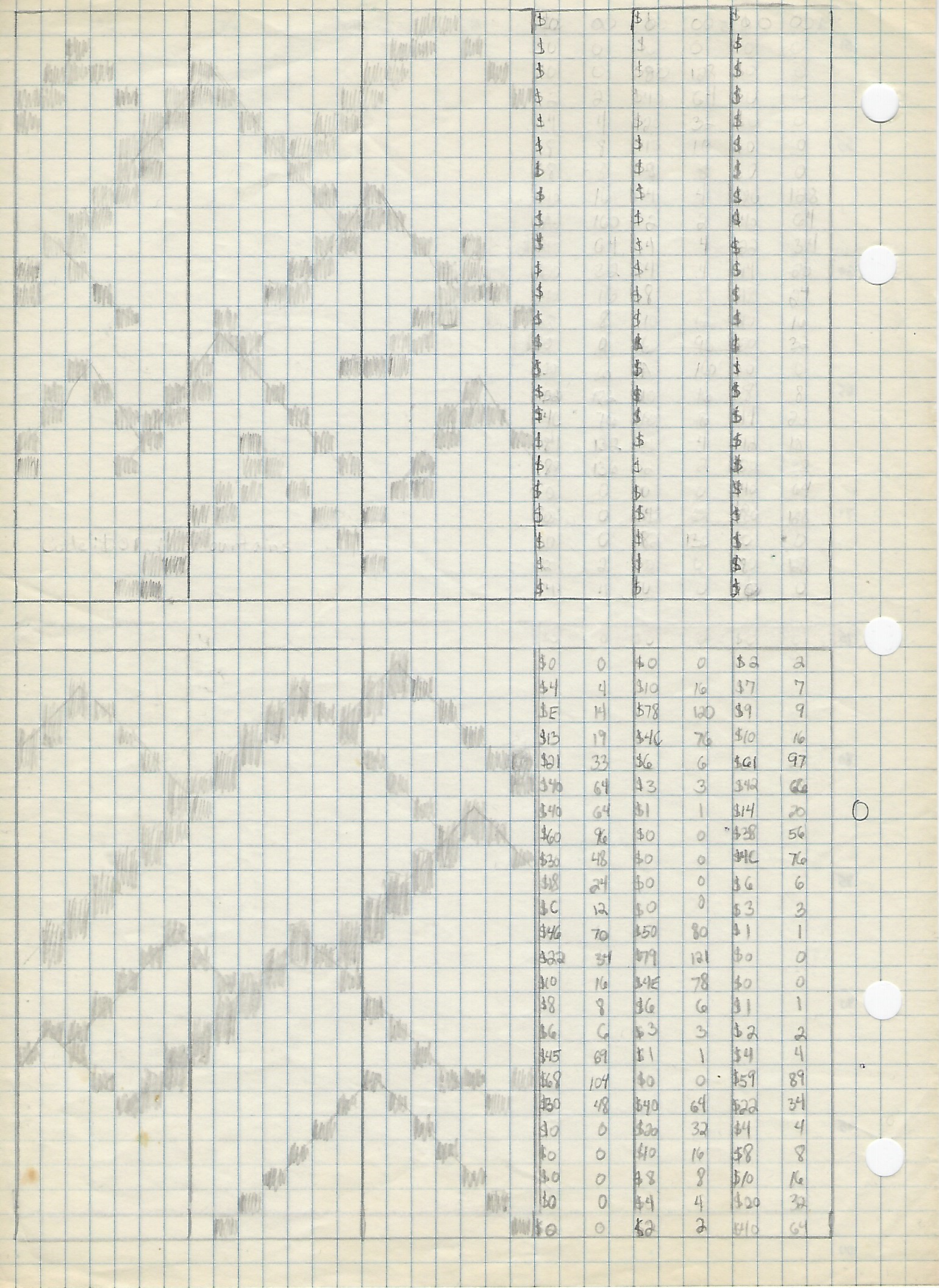
Worksheet from high school

The assembly routine was past a set of coordinates and then proceeded to move the appropriate 2D images directly to the graphics memory. On the Apple ][+ there was a range of memory somewhere in the 48 Kb that was used to put pixels on the monitor. To complicate matters, the lines on the monitor were interleaved, ostensibly to make rendering more fluid. In any event, using the multiplication routine above, I figure out how to do it.

The happy news is that it worked! I even enabled a version of sprites so that water and humanoids looked like they were moving. I had mountains, trees, cities and oceans. Using the keyboard, characters were able to move up, down, left or right. Naturally, there were encounters with monsters. The battles were turn-based and took place in text. In the end, I had a simple game which vaguely resembled my beloved Ultima.

The sad news is that, with the passage of time, the magnetic materials on my cheap floppies degraded and the game was lost. To my regret, I never saved a printout of the code. That would have been cool to look at today. The only thing left is, regrettably, my memory.

With one exception! Recently my best friend from high school sent me my old Red Box with some D&D papers in it. I have no idea why he had this box, or why he kept it, but I was pretty delighted to see it. In there, I found a single sheet of paper from the game (inset).

As you can see, these are mountains. The 2D images where 3 bytes across (I can’t recall why they’re 7 bits, but I’m sure there was a good reason) and 34 rows, making the final image 21 by 34 pixels. My guess is that these dimensions were even multiples of the screen size. Anyway, while it’s difficult to tell, on the sheet I’m converting the pixels into hex which I then convert into decimal. I don’t recall why I wanted decimal.

Perhaps one day I’ll find a printout or more worksheets. I know that I had copious amounts of both, but they’re probably lost forever. Until then, however, I’ll have to be satisfied with this.

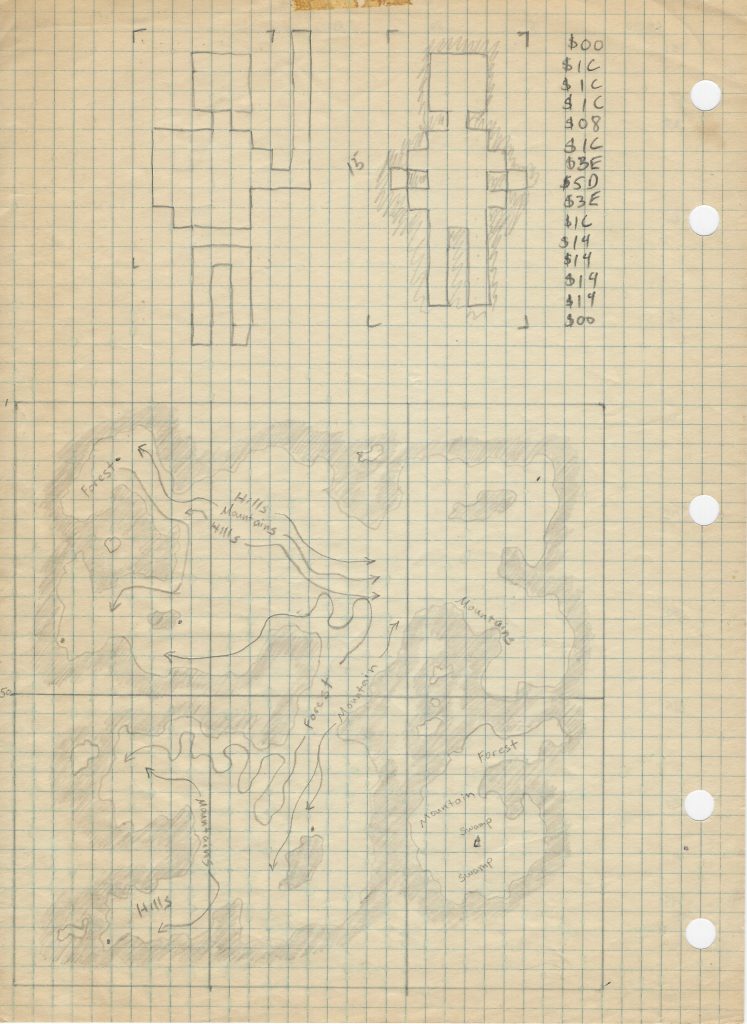
2021-11-27 update: Another page has been found! This one was in the same old Red Box but I didn’t notice it at first. It would appear to be a bitmap for the player’s character, translated into hex, with an idea for the world below.

Invitation only

I have had problems with spammers in the past. It is so annoying to be constantly inundated with robotic registrations requests. I guess the good news is that they are not in the site posting links for male enhancements.

In any event, as no one ever noticed, this website used to have a phpBB forum. It was a bit clunky and didn’t quite look like the blog, but it worked and had tons of functionality. Recently, however, I decided to migrate to bbPress. (The migration tool wasn’t great and I had to install a plug-in to customize the colors, because I didn’t feel like hassling with CSS, but I got everything over and it’s operational.) The reason was because my hosting provider only allows two DBs for my account level and I wanted one of them for something else. I didn’t know if bbPress would just use the same DB as WordPress, but turns out that it does. Win!

Anyway, for the past few years I’ve been wondering why the phpBB registration has been constantly hammered by spammers while the blog registration has not. I finally figured it out; my blog doesn’t have a registration!

I thought about opening the registration, but after doing a bunch of research on anti-spam plug-ins and moderation tools, I decided that invitation only is the best. Perhaps one day this blog will be large enough that I’ll want to invest in all that, but for the time being, anyone who wants in will just need to contact me and request an invitation. For what it’s worth I’m only giving invitations to people I know. Sometimes tiny communities are best.

No cs234 project

It was with a mix of disappointment and relief that I learned cs234, the final course for my Artificial Intelligence Graduate Certificate from Stanford, cancelled the project for this quarter. With the course going fully online due to the pandemic, the rational was to give everyone a bit of a break. That is perfectly reasonable given the work projects often entail, but it would have been pretty cool.

As such, development is once again suspended. (These Stanford courses are a lot of work, and there is a family and a job.) During the December sprint, however, I am happy to say that quite a bit of progress was made:

2020 GitHub Contributions
  1. A line of code was written – Just doing anything after 4 years is an accomplishment.
  2. Automated combat with enhanced messaging and logging – When I do get around to building a deep RL model to train the agents, this will be handy.
  3. Created the wizard class with wizard spells, including touch spell attacks – This one rounds out the fighters, clerics and rouges. I won’t be adding any new classes for a while.
  4. Group combat – Previously it was the ‘hero’ versus the monsters, but now two groups of combatants can fight each other.
  5. Charging, flanking and cover – These add a little more dynamic to the combat.
  6. Ferocity – Orcs just became much more challenging.
  7. Fixed a bunch of bugs – Always a decent idea.

So, what does all this progress look like? Here’s a little demo video set to O Fortuna from Carmina Burana by the MIT Concert Choir.

I’ll try to pick it up again in April, but we have to see how that goes.

A line of code has been written

The title’s deliberately passive voice is intended to comically understate the fact that it has been four years since I last worked on this project. Four years! I previously wrote about the delay, but the long story short is that life got busy and I got distracted with, arguably, much more important things. That being said, I am giving it another go. The renewed motivation comes from an unlikely source: Stanford University.

Over the past several years I have become quite passionate about AI, taking a number if different MOOCs, reading various book and pursuing some personal projects to explore the domain and learn the technology. One day in late 2018, gazing out of my office window at PARC, I spied the spire at the top of Hoover Tower and thought to myself, “I bet they have got some AI classes over there.”

Turns out they do. More specifically, turns out they have a Graduate Certificate in AI which offers a 4-course, 16-unit program of master’s-level instruction in AI. What could be better than that? A statement of motivation and a couple transcripts later, I was in. With a family and demanding full-time job I knew that pursuing graduate coursework would be challenging, but if I took only one course at a time, how hard could it be?

I quickly discovered that it could be very, very hard. Deep Learning (cs230) with Prof. Andrew Ng was the first course I took, which was probably a good choice. It was not a ton of work, until the final project, but the midterm was shockingly difficult. AI Principals and Techniques (cs221) is the only required course for the Certificate, so I took that next. It wasn’t too difficult, and I was more prepared for the midterm, but it was a lot of work and our final project was challenging. Then I took Machine Learning (cs229), again with Prof. Ng. It is notoriously one of the most difficult courses in the department and it lived up to its reputation. It was also an amazing amount of work and really tested my family life, but I survived that, too. In fact, we all did.

So what is this all about? For my last class I am signed up to take Reinforcement Learning (cs234) with Prof. Emma Brunskill. What does that have to do with Mortal Wayfare? Well, like all the courses, there is a final project. I therefore thought it could be really cool, for the final project, to implement RL within the game to ‘teach’ the actors (i.e. monsters and NPCs) to fight optimally. You can tell from game play that most RPGs use a simple rules-based decision engines to control enemies during combat. With a complex D&D-based system, however, constructing those rules can be complicated and the end result is often flat. I am curious to know what sort of dynamic and exciting combat I might be able to get by leveraging the materials from the course. To be able to do that I need to get the game back in working order as well as build a mechanism for fully-automated, repeating combat. After only a week, which I’m chronicling on Twitter, I am getting closer, but we will see how it goes. The course starts in January, so I am running out of time. Whatever happens, however, I will report back here.

In any event, unwilling to stop after course number four, I have already submitted my application for the MSCS program. Wish me luck!